AI Agents for Business: Use Cases, Cost Drivers and First Steps
AI agents for business are software systems that work towards a goal using approved company information and tools. This guide explains what they can do, where they fail, what affects their cost, and how to decide whether to buy, integrate or build one.

AI agents for business are software systems that can work towards a goal, use approved company information and tools, take permitted actions, and check whether a task is complete. Unlike a tool that only generates an answer, an agent can move work forward inside a real process. That extra ability can be valuable, but it also adds cost, integration work and risk. The practical question is not whether your company needs an agent. It is whether an agent is the simplest reliable way to improve a specific workflow.
What is an AI agent for business?
A business AI agent receives a goal or responds to an event, gathers relevant context, decides what to do next within defined limits, and uses connected tools to complete a task. Its tools might include a CRM, help desk, document repository, email service, ERP or an internal API. Instructions, permissions and business rules define what it may do and when it must stop or ask a person for help.
OpenAI’s practical guide to building agents describes the core of an agent as a model, tools and instructions. Anthropic’s Building Effective Agents adds a useful distinction: a fixed workflow follows paths defined in code, while an agent dynamically chooses how to proceed. Not every AI-powered interface or automated process is therefore an agent. A chatbot that answers from a knowledge base may be useful without being agentic. A rule that copies every approved invoice into an accounting system is automation, even if AI extracted the fields.
What can AI agents for business actually do?
AI agents are most credible when described as specific jobs rather than digital employees. A useful design starts with four questions: what triggers the work, what information is needed, what action should be taken, and when should a person become involved?
Customer-support case handling
A new ticket, email or chat message triggers the work. The agent uses the customer record, order history, documentation and support policy to classify the issue and determine a response. It can draft a reply, route the ticket, update fields or complete an approved low-risk action. It should escalate uncertain identities, conflicting evidence, vulnerable customers, sensitive exceptions and material refunds.
Internal knowledge retrieval
An employee’s question starts the task. The agent searches approved policies, project records or technical documentation and returns an answer with links to its sources. A person should review the result when documents disagree, the source is outdated, or legal, HR, security or financial judgment is involved.
Sales and CRM administration
A new lead, meeting note or account change can trigger the workflow. The agent reads the CRM history, extracts structured information, updates permitted fields and drafts a follow-up. Human approval is sensible before external communication, pricing commitments or account disqualification.
Document processing
An uploaded form, invoice or contract begins the process. The agent classifies it, extracts relevant data, checks business rules and sends valid cases to the next system. Low-confidence extraction, missing information and contradictory values should go to a reviewer.
Operational monitoring
A threshold, anomaly or scheduled check starts the workflow. The agent combines relevant alerts and operational data, investigates likely causes and prepares a response. It may open a ticket automatically, but actions that interrupt a service, alter production, move money or change access should normally require approval.
Multi-step administrative work
A supplier-onboarding request may require an agent to collect documents, request missing information, update systems and prepare an approval pack. This is useful when the sequence varies but remains bounded by policy. A person should own exceptions and decisions that require commercial, compliance or relationship judgment.
In our own ecommerce support product, we keep automated replies and order actions under separate controls. A refund request shows why this matters. The AI can retrieve the order, consult the returns policy and prepare a proposed action, while a person retains approval of the refund. A reliable workflow also needs to verify the customer’s entitlement, calculate the eligible amount and check the store’s response after execution. Permission to send routine replies should not automatically grant permission to move money. The customer-facing message should reflect the confirmed state, including when the refund is still awaiting approval or being processed.
How does an AI agent work?
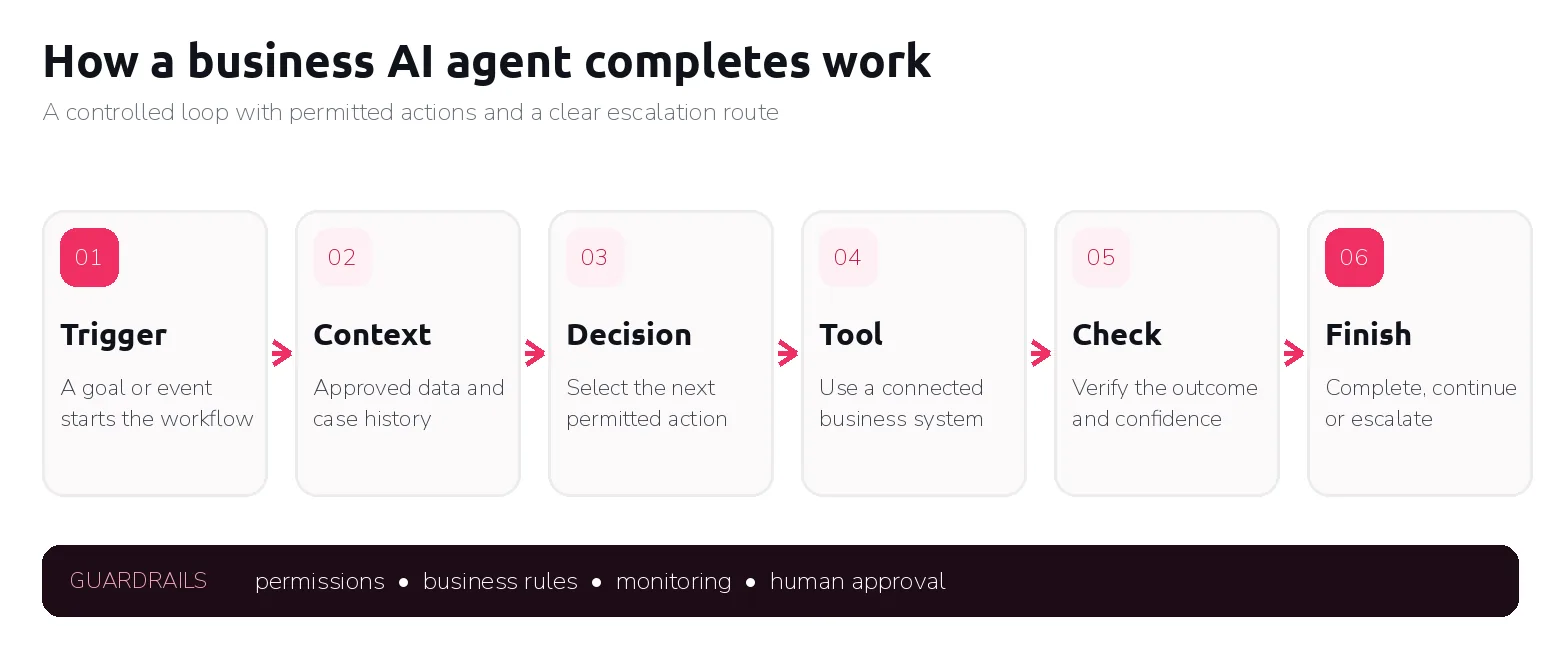
The details vary, but a well-bounded agent usually follows the same operating loop:
- A goal or event starts the workflow. A person gives an instruction, a ticket arrives, a scheduled check runs or another system sends an event.
- The agent gathers context. It retrieves only the information required for the task from approved sources.
- It chooses the next permitted action. The model interprets the case while instructions and business rules restrict its options.
- It uses a tool or connected system. This might be a search, API call, CRM update, document action or message draft.
- It checks the result. The agent reads the tool response or system state instead of assuming the action succeeded.
- It continues, finishes or escalates. It repeats the loop until it meets a stopping condition, needs approval or cannot proceed safely.
This simple flow depends on system integrations, explicit rules, limited permissions and monitoring. Logs should show what the agent did and with which information. The people responsible for oversight need enough context and authority to intervene effectively.
AI agent vs chatbot: what is the difference?
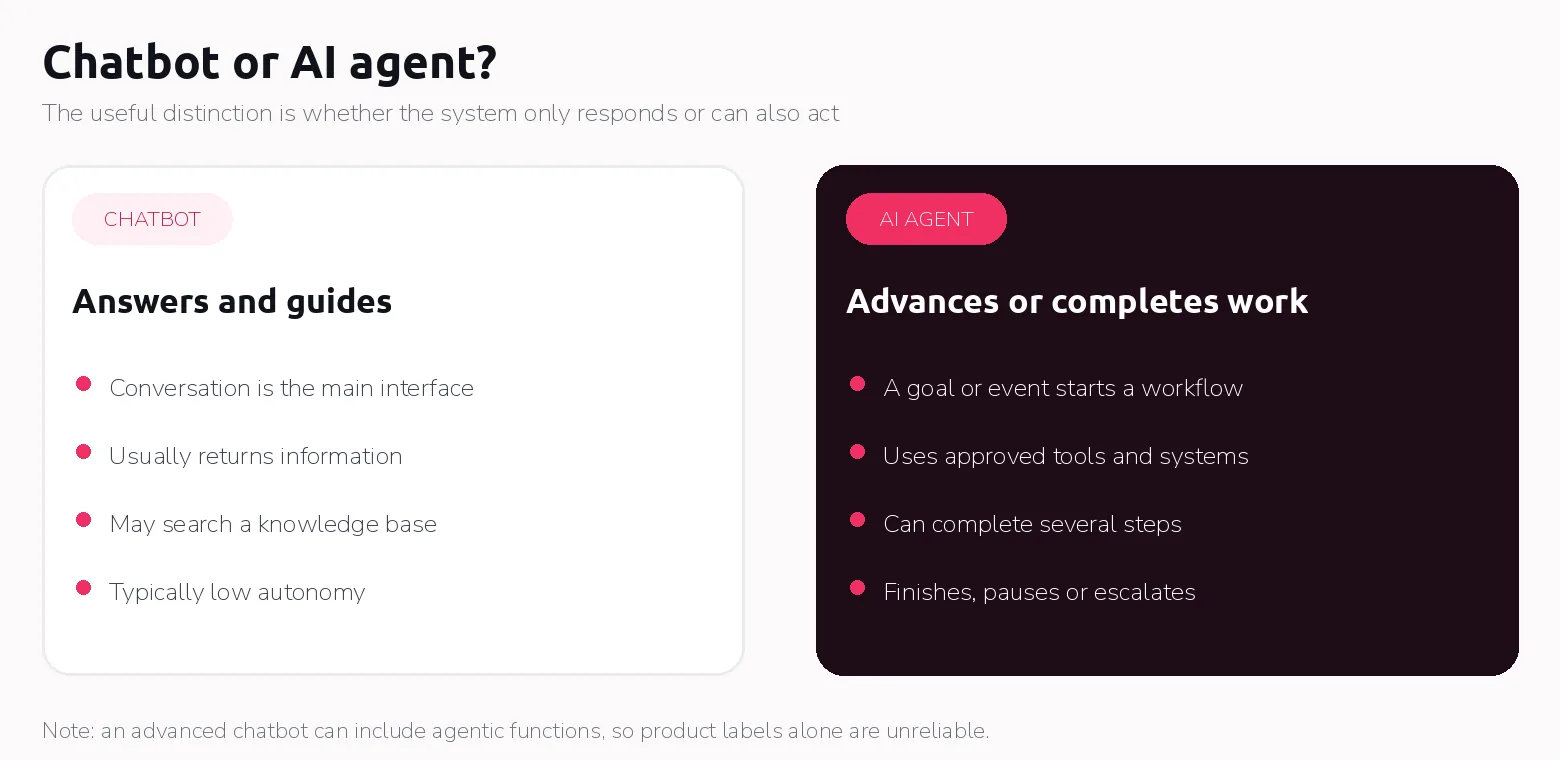
The clearest distinction is that a chatbot is designed mainly to conduct a conversation, while an agent is designed to pursue a goal and take action. The boundary is not absolute. An advanced chatbot can include agentic functionality, and vendors do not always use the terms consistently.
| Comparison | Chatbot | AI agent |
|---|---|---|
| Primary purpose | Answer questions or guide a conversation. | Complete or advance a task towards a goal. |
| Ability to take action | Usually limited or absent. | Uses approved tools to perform permitted actions. |
| Access to business systems | May search a knowledge base. | May read from and write to connected systems. |
| Multiple steps | Usually responds one turn at a time. | Can plan or select several steps and check results. |
| Degree of autonomy | Low. | Variable, from approval-led to more autonomous. |
| Human oversight | Needed for uncertain or sensitive answers. | Designed through permissions, approval gates, monitoring and escalation. |
| Typical business use | FAQs, navigation, basic support and information retrieval. | Case handling, administration, monitoring and other multi-system workflows. |
An AI assistant is another useful middle category. It helps a person research, draft, summarise or analyse but leaves the user in control of execution. Many businesses need an assistant, not an autonomous agent. Likewise, a deterministic automation remains preferable when the steps can be defined in stable “if this, then that” rules.
Where are AI agents most useful?
AI agents are a good fit for tasks that occur frequently and have a clear objective. The required information should be accessible and reliable. While the task may involve interpretation or several possible steps, the agent should operate within defined boundaries. A strong use case also has measurable outcomes, traceable actions, clear ownership of exceptions, and a way to review or reverse important decisions.
The best candidates often sit between two extremes. They are less predictable than conventional automation handles comfortably, but not so ambiguous or consequential that every case demands expert judgment.
Anthropic recommends increasing complexity only when it improves results, noting that agentic systems can exchange higher latency and cost for flexibility. OpenAI similarly advises checking whether a deterministic approach is sufficient. Flexibility has value only when the process needs it.
Useful measures should be agreed before development. Depending on the workflow, these may include completion rate, accuracy, cycle time, cost per completed case, human review time, escalation rate, reversal rate and the frequency of serious errors. A pilot without a baseline can show that the technology works while revealing little about whether it improves the business process.
When should a business not use an AI agent?
An AI agent is unnecessary when a simple rule-based automation can perform the task more reliably. If every approved invoice follows the same validation rules and system path, a conventional workflow may be cheaper, faster and easier to audit. A chatbot or assistant may also be enough when the real need is answering questions, finding information or drafting content for a person to use.
An agent is also a weak choice when the task occurs too rarely to justify the effort, the data is unreliable, the process has no owner, or a standard SaaS product already solves the problem. Buying is often preferable for common functions when the product’s controls and integrations fit.
The risk becomes more serious when mistakes can cause unacceptable financial, legal, safety, employment or customer consequences. Generative models can make incorrect assumptions or rely on misleading data, and errors can compound across several steps. Excessive permissions increase the impact because an error can alter records, send communications or change system state.
NIST’s AI Risk Management Framework treats risk management as a continuous lifecycle activity rather than a one-time launch check. OWASP highlights excessive autonomy, over-broad permissions and missing approval gates as security concerns. For UK organisations, the ICO warns that agentic systems using personal information can make transparency, accuracy and meaningful human intervention harder, particularly when they contribute to decisions about people.
Human-in-the-loop review is necessary when a decision is high impact, evidence is incomplete, policies conflict or an action is difficult to reverse. The reviewer needs context, authority and a real ability to reject the proposed action.
Finally, do not deploy an agent that cannot be monitored. Policies, systems, model behaviour and data change. It needs an owner, logs, evaluation cases and an incident route.
One lesson from our internal workflow tooling is that a timeout does not tell you whether an action failed. A connected system may have accepted a change before the response was lost. Automatically trying again can then create a duplicate record or repeat an action. We recommend defining completion through a verifiable system result, with separate states for awaiting approval, in progress, confirmed and outcome unknown. If the outcome is uncertain, the workflow should check the connected system or ask a person to investigate before repeating the action. A convincing answer from the AI is not sufficient evidence that the underlying work is complete.
How much do AI agents cost?
There is no defensible universal AI agent cost. The term covers a subscription product, a configured platform and a custom production service. A useful estimate separates one-time validation and implementation from ongoing operation, review and maintenance.
For an existing product, the visible price may be per user, action, conversation, resolution or usage unit. Full cost can also include configuration, connectors, data preparation, security review, training and human oversight. A configured platform adds integration and testing. A custom agent adds software design, deployment and long-term ownership.
| Cost driver | What it includes | How it changes cost |
|---|---|---|
| Discovery and use-case validation | Process mapping, baseline measures, risk and feasibility assessment. | Reduces the chance of funding the wrong problem but requires early specialist time. |
| PoC or prototype | Limited workflow, sample data, basic evaluation and controlled demonstration. | Lower initial scope, but not a substitute for production controls. |
| Production implementation | Reliable workflow logic, interfaces, deployment, error handling and documentation. | Increases with autonomy, volume, availability and business criticality. |
| Integrations | APIs, identity, legacy systems, data mapping and write actions. | More systems and fragile interfaces increase engineering and testing effort. |
| Data preparation | Access, cleaning, indexing, permissions and document quality. | Poor or fragmented data can become a larger cost than the model itself. |
| Security and access controls | Authentication, least privilege, approval gates, audit logs and threat testing. | Sensitive data and high-impact actions require stronger controls. |
| Model and infrastructure usage | Model calls, storage, retrieval, compute, observability and vendor charges. | Grows with task volume, context size, number of steps and model choice. |
| Testing and evaluation | Test cases, edge cases, quality thresholds, red-team testing and user acceptance. | Higher-risk workflows need broader and more frequent evaluation. |
| Monitoring and maintenance | Performance review, prompt or rule updates, incident handling and integration changes. | Continues for as long as the agent is in use. |
Complexity is more useful than a headline price. A low-complexity implementation uses one workflow, clean data, mature connectors and approval before actions. Medium complexity spans several systems and needs role-based permissions and systematic evaluation. High complexity involves critical systems, sensitive data, many exceptions or strict availability, audit and regulatory requirements.
When comparing proposals, ask suppliers to price the same workflow and state what is excluded. Model expected volumes, retries and human reviews, then track cost per successful completion rather than cost per model call.
We assess integration complexity by what the agent must read or change, how reliably that information can be accessed, and whose permissions must be enforced. A read-only assistant querying one documented API has a smaller scope than a workflow reconciling records across accounting, product-design and production systems. Complexity rises when identifiers do not match, records disagree, APIs need custom work, or users should see different fields. Write access adds validation, approvals, duplicate prevention and confirmation of the result. Having an API available is a starting point; the estimate must also cover the work needed to make the business process reliable.
What is the best AI agent for business?
The best option is the one that solves the defined problem reliably, fits existing systems and controls, and costs less to own than the value it creates. In some cases, the best choice is not an agent.
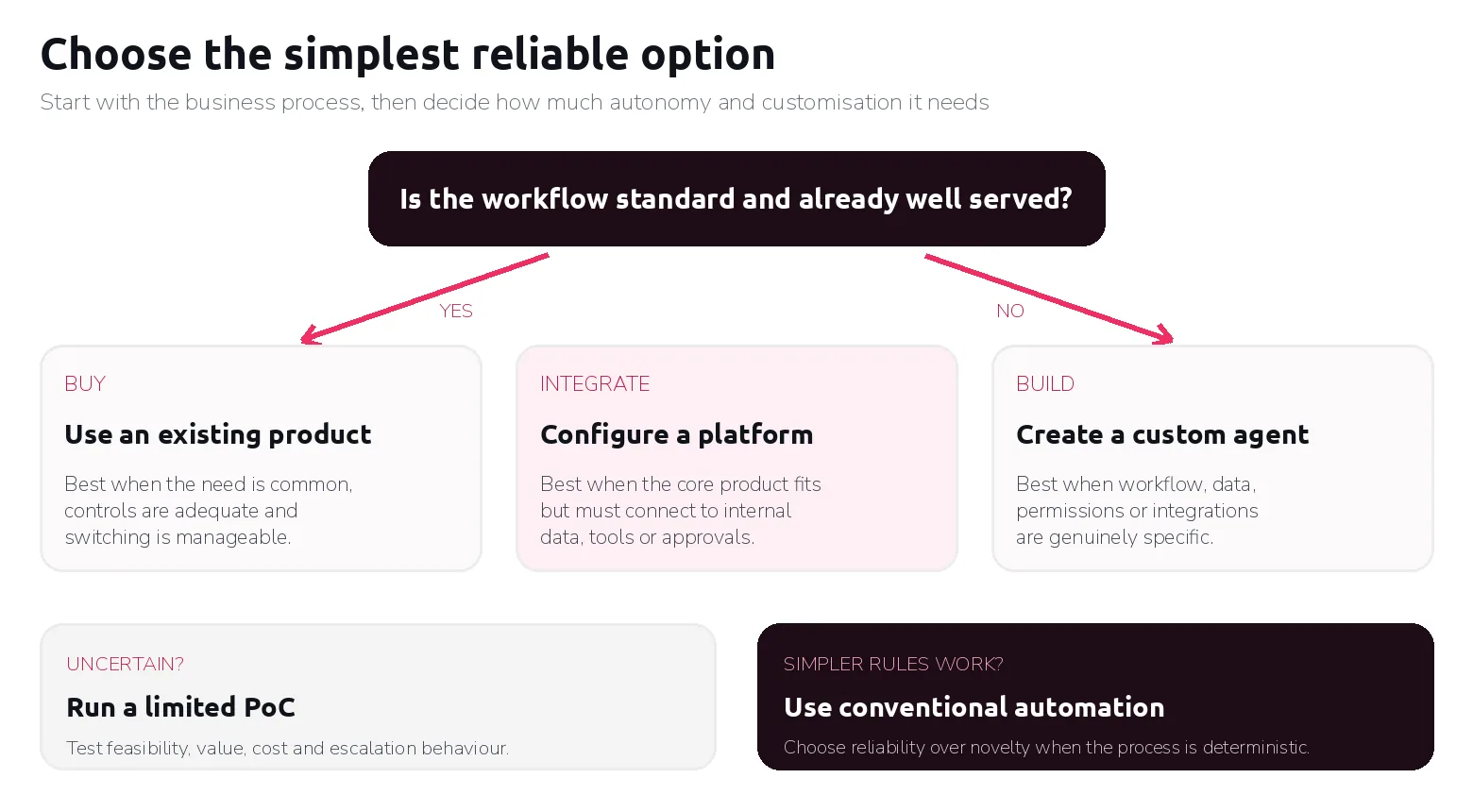
Buy an existing tool when the need is standard, the product already performs the workflow well, its security and data terms are acceptable, and its integrations fit. This is normally the fastest way to test a common use case.
Configure or integrate a platform when the core product fits but needs company knowledge, identity controls, approval rules or internal connections. This is the middle ground between a generic subscription and custom development.
Build a custom AI agent when existing products cannot represent a specific workflow, its rules or permissions, or its unusual system connections. Custom development may also be justified by ownership, auditability, deployment constraints or meaningful differentiation. Technical possibility alone is not a reason to build. Our AI engineering services cover this route, and custom software development covers the systems around it.
Begin with a PoC when feasibility, data quality or commercial value is uncertain. Test the hardest assumption with limited data, tools and permissions, and use the result for a go, change or stop decision.
Use conventional automation when the path is stable and deterministic. Predictability is a feature. Adding an AI decision layer to a process that does not need judgment can increase cost and failure modes without improving the outcome.
We recommend answering three questions before choosing a delivery route:
- What exact job must be completed, and which decisions require interpretation? This establishes whether conventional automation is sufficient.
- Can an existing product handle that job with the required data, permissions and approval steps? This shows whether buying or integrating can cover the need.
- What must the business own or customise, and does its value justify development and ongoing support? This tests the case for a custom build.
For example, employees who need answers from accounting data may be able to start with an existing AI interface and a restricted connector. A separate application becomes worth evaluating when the workflow needs controls or capabilities that the existing environment cannot adequately provide.
How to start with an AI agent
- Select one specific workflow. Define the event that starts it and the result that counts as complete. “Improve customer service” is too broad; “classify new support tickets and prepare replies for the five most common request types” is testable.
- Document the current process and exceptions. Map who does what, which systems they use, where delays occur and which cases require judgment. If the team cannot explain the current process, the agent will inherit that ambiguity.
- Identify the required data, systems and actions. Distinguish what the agent must read from what it may change. Check data quality, access methods and ownership before selecting a platform.
- Define permissions, restrictions and approvals. Give the agent the minimum access needed. Set transaction limits, prohibited actions, confidence or evidence thresholds, escalation rules and stopping conditions.
- Decide whether to buy, integrate or build. Evaluate mature products first for standard needs. Compare total ownership cost, fit, control, time to value and exit options, not feature lists alone.
- Test the hardest assumption through a limited PoC. Use representative cases in a safe environment. Restrict scope and avoid irreversible actions. Test difficult and unusual cases.
- Measure performance against a baseline. Track accuracy, completion rate, time, cost, human review effort and escalation rate. Include severe-error measures even when those events are rare.
- Expand only after value and risks are understood. Move to production with monitoring, named ownership and incident handling. Increase volume, permissions or workflow coverage gradually.
Microsoft’s adoption guidance recommends testing technical feasibility through a small pilot, defining business metrics before development and using those metrics as decision gates. That discipline is more valuable than a polished demonstration alone.
For a first PoC, we recommend agreeing on real test cases and expected outcomes before development. A read-only accounting assistant should return correct reference answers, trace figures to their source and allow zero access or changes outside its permissions in the agreed tests. A workflow that takes action also needs tests for missing data, conflicting records, duplicate requests, expired permissions, attempts to bypass approval, and a timeout after an external system accepts a change. Every critical control test must pass; unresolved failures block progression. The business owner should also set an accuracy target, a maximum cost per completed case and a required improvement in handling time. Passing the PoC supports investment in production engineering, with broader evaluation before wider rollout.
Choosing the process before choosing the agent
AI agents for business can help when a workflow needs flexible interpretation and controlled action across systems. They are less suitable when rules are stable, data is poor or no one can supervise the result.
The right starting point is not choosing an AI agent. It is choosing a suitable business process and determining the simplest reliable way to improve it. That may be conventional automation, an existing product, a configured platform or a custom agent.
If you are evaluating a specific workflow, WyrdIT can help map the process, test its feasibility and determine whether buying, integrating or building is justified. The goal of an initial discussion or PoC should be a clear decision, including when not to proceed.